{ ReactJS } Basic React 2
JSX & State
Introduction of JSX
- ‘J’avaScript ‘S’yntax e’X’tension
- JSX allows you to write HTML in React.
- JSX makes it easier to write and add HTML in React.
- Babel is a JavaScript compiler which mainly used to convert code into a backwards compatible version of JavaScript in current.
Before (Compile 전)
const root = document.getElementById("root");

    const title = React.createElement(
     "h1",
     {
        onMouseEnter: () => console.log("mouse enter"),
     },
     "Hello I am a title"
    );

    const btn = React.createElement(
      "button",
      {
        onClick: () => console.log("I am clicked"),
      },
      "Click Me"
    );

    const div = React.createElement("div", null, [span, btn]);

    ReactDOM.render(div, root); // show it to the user (render)
After (Compile 후)
<body>
  <div id="root"></div>
</body>

<!-- Import CDN links -->
<script crossorigin src="https://unpkg.com/react@17.0.2/umd/react.production.min.js"></script>
<script crossorigin src="https://unpkg.com/react-dom@17.0.2/umd/react-dom.production.min.js"></script>
<!-- Import @babel/standalone -->
<script src="https://unpkg.com/@babel/standalone/babel.min.js"></script>
<!-- will compile and execute 'All' script tags with type = "text/babel" or "text/jsx" -->
<script type="text/babel">


  /* Two ways; 1. return an element 2. arrow function ( prefered ) */
  function Title() {
    return (<h1 id="title" onMouseEnter={() => console.log("mouse entered")}>
      Hello I am a title
    </h1>);
  }

  const Button = () =>
    <button
      style=
      onClick={() => console.log("I am clicked")}>
      Click Me
    </button>

  /*const div = React.createElement("div", null, [Title, Button]);*/
  const Container = () => (
    <div>
      <Title />
      <Button />
    </div>
  );

  ReactDOM.render(<Container />, root);
</script>
State
- State is basically where the data will be.
Before - render() 함수를 계속 불러줘야 했음
<body>
  <div id="root"></div>
</body>
...
<script src="https://unpkg.com/@babel/standalone/babel.min.js"></script>
<script type="text/babel">

  const root = document.getElementById("root");

  let counter = 0;

  function countUp() {
    counter = counter + 1;
    render(); // 변경된 데이터 저장을 위해 render() 함수를 계속 불러와야 했음
  }

  function render() {
    ReactDOM.render(<Container />, root);
  }

  const Container = () => (
    <div>
      <h3>Total clicks: {counter}</h3>
      <button onClick={countUp}>Click me</button>
    </div>
  );

  render();

</script>

</html>
Understand useState()
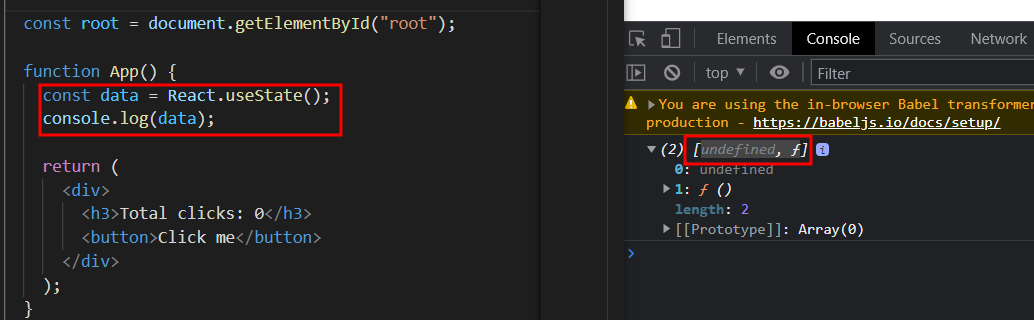
- ‘undefined’ is data value
- ‘f’ is a function which is used to modify data status
After - render() 함수를 계속 불러줄 필요 없이 자동으로 업데이트
  const root = document.getElementById("root");

  function App() {
    /*
    modifier(setCounter) 함수를 사용하여 state 를 바꾸면
    App component 가 재 생성되고 화면에 자동으로 렌더링 해줌

    즉, 모든 요소를 재생성해서 다시 렌더링 해준다.
    */

    /*
    counter: 값;
    setCounter: 값을 변경해 줄 function;
    useState(x): x is default value
    */
    const [counter, setCounter] = React.useState(0);

    const onClick = () => {
      /* render 해 줄 필요 없이 자동으로 업데이트 해줌 how cool is that...*/
      setCounter(counter + 1);
    };

    return (
      <div>
        <h3>Total clicks: {counter}</h3>
        <button onClick={onClick}>Click me</button>
      </div>
    );
  }

  ReactDOM.render(<App />, root);
Practice more about using State
<script type="text/babel">

  /*
    Notice that you are using the jsx
  */

  /*
    1. 분을 초로, 초를 분으로 자동으로 변환하는 Converter 를 만들 것
    2. state 활용
    3. onChange function; one in charge of basically updating the data
    4. flip & reset function 구현
    5. disabled property 활용
  */
  function App() {

    const [amount, setAmount] = React.useState(0);
    const [inverted, setInverted] = React.useState(false);

    // Set the previous amount to changed value
    const onChange = (event) => {
      /*console.log(event.target.value);*/
      setAmount(event.target.value);
    }

    // Reset the amount
    const reset = () => setAmount(0);

    // Enable or disable flip for two input boxes and converted value
    const onFlip = () => {
      reset();
      setInverted((current) => !current);
    }

    return (
      <div>
        <div>
          <h1> Super Converter </h1>
          <label htmlFor="minutes">Minutes</label>
          <input
            // 조건부 연산자 '?' - 물음표 연산자
            // condition ? val1 : val 2 => condition 이 true 면, val1 otherwise val2
            // if is flipped, it shows converted value, other
            value={inverted ? amount * 60 : amount}
            id="minutes"
            placeholder="Minutes"
            type="number"
            onChange={onChange}
            /* Make comparison */
            disabled={inverted}
          />
        </div>
        <div>
          <label for="hours">Hours</label>
          <input
            value={inverted ? amount : Math.round(amount / 60)}
            id="hours"
            placeholder="Hours"
            type="number"
            onChange={onChange}
            disabled={!inverted} />
        </div>
        <button onClick={reset}>RESET</button>
        <button onClick={onFlip}>{inverted ? "TURN BACK" : "INVERT"}</button>
      </div>
    )
  }


  const root = document.getElementById("root");
  ReactDOM.render(<App />, root);

</script>